Explore how FormFlow permissions (Launcher, Editor, Viewer) and step assignments determine user access in QlutchQMS. Learn who can launch, revise, or view instances, and how tasks appear in BaseCamp.
Guide date: 2025-09-08
A guide to understanding user access and task visibility in QlutchQMS FormFlows
Understanding FormFlow Permissions
Each FormFlow is secured by permissions that determine what a user can do inside the FormFlow App. There are three main permission types:
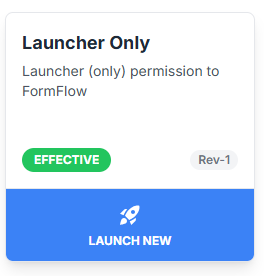
Launcher
What Launchers Can Do:
View FormFlow Card in the FormFlow App.
Launch New instance of the FormFlow.
What Launchers Cannot Do:
Cannot view instances of launched FormFlows.
Cannot revise the FormFlow.
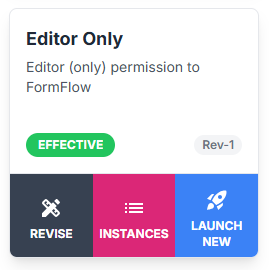
Editor
What Editors Can Do:
View FormFlow Card in the FormFlow App.
Launch the FormFlow.
Revise the FormFlow.
View Instances of launched FormFlows.
What Editors Cannot Do:
N/A - Editors permission allows user to launch, revise and view instances of a FormFlow.
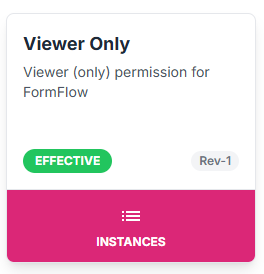
Viewer
What Viewers Can Do:
ViewFormFlow Card in the FormFlow App.
View Instances of launched FormFlows.
What Viewers Cannot Do:
Cannot launch new FormFlow instances.
Cannot revise the FormFlow.
What is a Step Assignee
Step Assignees are users who are assigned a task to complete within a FormFlow once it is launched.
Step Assignee is not a permission - it is a task role.
Step Assignee Capabilities:
Assigned a task in BaseCamp at the step they’re responsible for.
After completing the assigned step(s), the task disappears from BaseCamp.
Still able to view instances, just as a user with Viewer permissions would.
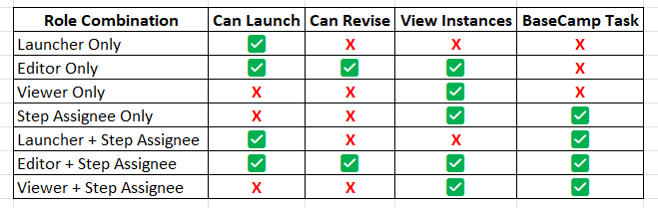
Common Combinations of Permissions + Assignments
Final Tips:
Users can be assigned multiple roles on the same FormFlow.
Being a Step Assignee does not override permission limits—it simply enables participation in the process.
For optimal collaboration, assign roles based on what the user needs to see, do, and complete.